
When opening a freshly installed emacs, there should be a "Emacs Tutorial" link that can be clicked; also the keyboard shortcut `C-h t` (which is «Control + `h`, then `t`»).
There is a similar feature in `neovim`, when opened type `:Tutor` (which is «`:` to open the command prompt, with command `Tutor`»).
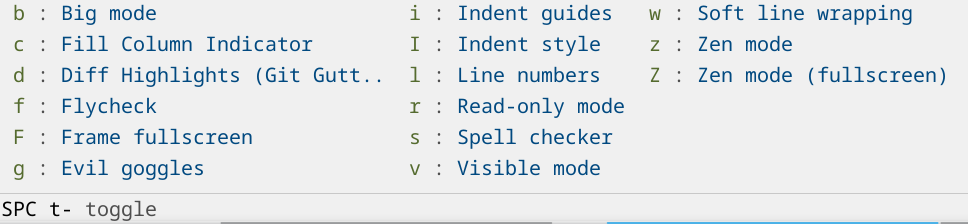
You do have that somewhat with packages like which-key that will show you a menu of options every time you press a key. You then learn the keybinds that you use the most. You can also search for them by name and see the keybind like you do with VS Code etc..
Here's what doom-emacs looks like when I press space and then space-t:

I don't think this is really possible. The thing that makes it special is that there are key binds for all the 100s of things you could want to do. So it becomes sort of like playing a instrument where you use your muscle memory instead of thinking specifically about the keys. If you make a bunch of menus and buttons to do the things it would be a mess and probably not very nice to use. Emacs actually has buttons and GUI controls for lots of the functionality, but it kind of sucks to use it that way.
These setups are impressive specifically because the creator has put in the time and effort to become an expert at using their editor. There is just no way to hand that over to someone else as-is without any investment from the recipient in skill development.
Sadly, "these days" is a low bar. The days of consistent platform-specific "Human Interface Guidelines" are over, it's all just a browser wrapped in a top-level window or something that simulates that, with most interaction patterns being a cargo cult of how it's remembered from the 90s. So "GUI" means that some unique overlays can be drawn without a fixed width character grid and that you might get the original file requester now and then.
What was the Apple Dev account needed for? Previously I remember it was only needed for submitting apps to the App Store, not running Dev builds locally.