
I've grown to appreciate unapologetic trolling of people who care way too much about what other people do to themselves or their own private property.
https://www.hellcat.org/threads/this-is-what-happens-when-th...
The flame war on whether the original chassis design sucks or rocks is not that interesting.
Maybe the next phase of Apple could return to flowing shapes and save our wrists.
If your wrist is in contact with the edge of the laptop while you are actively typing, then your typing style has a good chance of giving you RSI. You'd be better off trying to fix that than trying to make the fast path to RSI more convenient.
In my first job - i think it was in 1997, I had my own small room with an L-shaped desk with a rounded corner. That gave a few inches of space for resting my arms - both when typing on a quite reasonable Pentium laptop, and especially when using the mouse.
Since then, the desks and the chairs has become shittier and shittier. Except perhaps when a was a consultant for an HR-department.
The U-shaped desk was probably the best ergonomically designed workplace I've had. Maybe a wheat-filled pad along the desk would have made it better.
If your arms are resting, then your fingers and wrists are doing the maximum amount of reaching as you type. If you use a wrist rest you are encouraging your fingers/wrist to reach up (bend in your wrist) instead of neutral or reaching down (more natural position).
The screen on my Macbook Air has been the exception. I wonder why they can't just use the same display on those that they do iPad. Seems better quality, as well
Note: Left hand wrist areas are currently out of stock.
Later on the topic came up online and someone noted something to the effective of:
“If I saw a group of photographers taking pictures, I bet I could pick out the best photographer just based on how beat up their equipment is.”
I realized based on my own experience, that was probably true.
The idea being use your tools and worry about the output, not how they look.
I also really like this article and am 100% supportive of people messing around and modifying their stuff.
The modding community is a shadow of its old self these days
Chopping the fenders on a Porsche 911 to install a widebody kit does not have the same weight as rolling the seams on an Jeep Cherokee.
Big difference between bolt-ons vs deeper mods too.
I get the feeling that might not be the greatest idea in some fields.
For example, anything that could kill you (or others) if it goes wrong. ;)
If I have it in my lap, the outer ball of each wrist is resting on the body to the left and right of the trackpad and that means my forearms are angled upwards, away from the edges. They never rest on the edge of the laptop until I use the trackpad, and then the puffy outer pad of my palm is resting on the laptop edge. Still very comfortable.
If I'm using it at a desk it's the same story. My seat is high enough (relative to the desk) that my forearms lift up and away from the laptop. Never resting on the edge.
Are people seated so low so that the desk height is at breast level and they're making T-Rex arms to reach the keyboard? It seems so intuitively obvious to avoid such positions.
If you have your arms at your sides, elbows should bend 90 degrees. Then just move your arms slightly forward and you'll end up somewhere around 95 degrees. Now you can rest your forearms on the desk. This won't save you from all kinds of RSI, but it might help your wrists, elbows and shoulder joints last a bit longer.
In either case, the most important thing is to keep your wrists in as straight and neutral position as possible, with your palms and wrists "floating" rather than resting on anything while actively typing. Having the wrists either flexed downward or extended upward is a really bad idea. Having the wrists turned out to the side isn't great either, but not as bad.
The keyboard should be positioned close enough to your body so that your shoulders can be relaxed with your upper arms hanging loosely. The laptop surface should be roughly parallel to your forearms, so if you have a high desk or table relative to your torso you will need to prop up the far side to tilt it up a bit.
For example, the monitor should be at eye level vertically but with laptop that's very hard to accomplish unless you position yourself in a reclined fashion to bring down your eye level closer to your lap - on a macbook you get wrist cuts like this.
One of the most important thing that makes a good ergonomic laptop is the ways it accomodates as many positions and setup as posible so your can rotate your working position to avoid excessive strain on one particular area. So when your back is tired you slouch down, when your wrists are tired you straighten up, when your eyes are tired you adjust the display brightness/theme etc.
When taken seriously it's totally possible to work safely even in poor conditions like outside or on a train but devices that completely ignore ergonomics just don't even give you the chance.
This is slightly misleading advice. The ideal place for the display has the top of the display at roughly eye level, or for a very large display maybe slightly above, which puts most of the display below eye level. Humans actually have great ability to look slightly downward for long periods of time while doing stuff with their hands, even while keeping their head held up straight, and indeed our eyes can more comfortably focus on close objects in the lower part of our field of view than straight ahead. What you don't want to do is slouch or bend your neck too much.
A laptop display attached to the keyboard usually isn't an ideal placement, but it's generally not too bad.
Welcome to "tech neck" - upper crossed syndrome, from looking slightly down.
You're inviting some surprising symptoms, not just neck and back pain, but things like numbness, tingling, or pain shooting down your arms. Really not fun.
Key posture correction seems to be pulling head back. Some physical therapy exercises can help as well.
https://deukspine.com/blog/tech-neck-forward-head-posture-tr...
In trying to picture this, I suppose there are certainly some stock photo models who'd feel the sharp edges:
google.com/images?q=person+using+laptop
I totally know what you mean about shifting positions. All the positions I've been in where I've felt the edges have been quite unergonomic, but perhaps not for everyone.
It's almost like y'all are different people...
The glare is annoying. I would like to work outside more often.
Mind you, I don't really like the poor isolation and floating ground causing a tingling sensation when you touch it while charging, the lid hinge doesn't quite have enough internal resistance, the keys get stuck way too easily, etc. The sharp-corners build defect is fine for me though.
My newer Air doesn't seem to have this problem. Also the screen is brighter, together with a mat finish it is better for using outside.
I recall audio equipment also not being grounded because the industry prefers not being grounded over being accidentally grounded to two different grounds causing voltage transients. Maybe the same reason now also applies to MacBooks? Or does someone know another reason why the outer shell of a MacBook is still spicy.
One can still obtain the 3-prong pigtail instead of the little 2-prong inline plug, and that one grounds correctly.
Unfortunately they only seem to make a 3-prong inline version in about 3 countries.
Keyboard on Macs is pretty much good, other than the early butterfly version, rest is definitely above average and it just feels good. Glare is a problem, but darkest basement is an overstatement.
It might not fit your workflow or you might be expecting super niche, but it is the worlds most popular laptop for both regular users and developers for a reason. Input devices and screen are significant part of the Macbook appeal, so definitely not almost unusable.
He wanted a razor blade made out of pure aluminum that had no function at all but stood as a testament to his design aesthetic.
I don’t care about the sharp edges because 1) they’re not actually that sharp. 2) I don’t rest my wrists on them.
I mostly work from a desk with an external monitor and the laptop cantered below it. I avoid mice and try to use keyboard shortcuts.
I’ve used Dells, HPs and Thinkpads and the current MacBook Pros are still my favourite design.
Horses for courses, I guess.
I also like the short-travel Apple keyboards, though, and if Apple made a tenkeyless Magic Keyboard with the standard layout for cursor movement keys, I'd probably be using it.
the lock screen doesnt show battery charge level. dead battery? mac wont start for 15 min on connecting power... still need half ass homebrew
Having just received an M4 in the mail with a completely flat battery, I can confirm this is nearer 10 seconds on Apple silicon (you are correct it used to be this way on Intel Macs)
And yes the keyboards are terrible too. Up to 2015 it was OK but I can't work with the butterfly ones and the "new and improved" scissor ones that came after that. They still have a lot less travel than the ones from up to 2015.
I never sanded my metal macbooks though I did do so with a plastic one I had. I just didn't really use them much as laptop anymore.
My Dell XPS is almost as sharp (there's a microscopic chamfer, which won't be enough to explain the difference), but because the body is wedge-shaped, the keyboard sits at a slight angle which makes it feel so much better to me. Propping the back of the Macbook on something helps - only needs to be 2-3mm to make a difference.
It's like the static electricity issues that plagued them in the 2010s. They produced shocks that were actually painful, the sort that I've only experienced before from CRT screens in metal housings. The chargers contained a grounding pin internally, but it wasn't actually connected to anything. Utter madness, and would have been such an easy thing to fix - but it persisted until they replaced the charging port with usb-c.
That is standard procedure in consumer electronics actually.
My work MBP is charged via external display and sure enough, I get zapped every now and then. The bundled charger also has just two pins.
- Battery: no other laptop comes even close
- Trackpad: I don't use a mouse anymore, no other laptop comes close
- Audio: No other laptop comes close
"Sharp edges" really don't bother me to be honest, I wouldn't have noticed it if nobody told me.
I have a nano-texture screen, and it works great in daylight.
Just goes to show how opinions can differ.
The tilde key exists in the key map here: https://developer.apple.com/library/archive/technotes/tn2450...
You can see how I did mine here if you're interested: https://github.com/bruse/dotfiles/tree/main/macOS (I suspect com.local.KeyRemapping.plist is most interesting, but the key layout file is there too, with some comments on how it was generated).
Problem is that I dont remember which, and if I remembered the model might very well not be in stock anymore. The other vendors with their always changing lineup of models make that impossible by choice.
If you can provide me an example of a laptop that beats one of those categories, it's objectively wrong. In all other cases, nope.
I'm pretty sure Apple doesn't pay any "influencers", but maybe they're doing the Mormon church thing and buying ads?
macOS font rendering has been worst in class since they removed subpixel-antialiasing. It's now a blurry mess on regular displays.
FWIW, I've had no trouble with Mac font rendering on bog standard 1440p and 4K external displays
> pretty sure Apple doesn't pay any "influencers"
It's true they probably don't need to, since they have a bunch of fanatics who buy whatever Apple releases just because it's Apple
See https://www.reddit.com/r/macbook/s/hbyVh5SJhw for another poor soul with the same caustic skin
It's easy for me to feel the mains frequency while gently rubbing the top surface of the MacBook while it's plugged in. Really feels unsafe, but neither me nor the computer have suffered any serious injuries yet.
That's due to interference suppression capacitor in the PSU. The safety standard puts the "touch current" limit at something like 300uA (0.3mA), which is definitely in "painful but not dangerous" territory. You do need to exercise caution when plugging in other devices that are also connected to the mains, since that amount of current and voltage can certainly damage sensitive electronics.
Old but good page on such measurements: http://www.aplomb.nl/SMPS_leakage/Doc_ie.html
And almost no other device I've ever used. My aluminum Framework does not do it. My wifes magnesium LG Gram does not do it.
I have felt it on other things but only extremely rarely. It's bizarre that whatever it is they're doing different, it's probably wrong, and they've kept doing it in every device for decades.
To describe the effect in more detail for anyone who doesn't already know: It's like the case is alternately grabbing and releasing your skin at 60hz.
It's a bit like chatter, ie the periodic friction you use to ring a wine glass by wetting the rim and then running your finger along it. It rings because the combination of the friction, the lack of friction from hydroplaning, and the rubbery give of your skin, makes your skin alternately grab and release 30,000 times a second. Only in this case you are only barely touching the case not pressing enough to make any friction or make a squeal noise. It's like static electric charge attraction. Just touching the case you feel nothing, but move your finger along the surface and you feel it vibrate your finger without any friction to explain it.
It's unsettling and displeasing, which are strange words to expect from an apple device at least when you are only talking about the design and not the tech stack or corporate behavior. It makes me think of cheap electronics from a country with no consumer safety regulations that will probably burn down every 3rd house they wind up in.
It's probably harmless, but then again a lot of things that are harmless in short infrequent doses turn out to have been harmful after you did it for 10 hours a day for 20 years.
I haven't been a regular Mac user, but I've had maybe 3 work MacBooks since 2010 and I recall having this issue with all of them.
Why haven't they fixed it?
It can be avoided by using a grounded power supply, but because there are large countries that have ungrounded outlets in common use the most designs are ungrounded.
It happens with other 2-pin chargers on both MacBooks and other laptops, but it depends upon various factors how strong the leakage is
so what I mean is maybe house electricity grid is not grounded.
The short version, where you remove the extension with the 3-prong plug and attach the plug directly to the charger brick, is only available in 2-prong in the EU/US (the UK thankfully still gets all 3 prongs in this configuration)
Anyway as I replied to the other guy (and got downvoted for it) if the plug was grounded there would be no issue. Apple chargers have ground pins.
But sure it's bad if they stopped including grounded versions by default in EU...
if you take the plug part from the brick you'll note that there's only two pins but the button-like thing is a ground
as noted in a sibling, the power adapter extension cable does plumb the ground through (https://www.apple.com/shop/product/mw2n3ll/a/power-adapter-e...)
US Version: https://www.apple.com/shop/product/mw2n3ll/a/power-adapter-e...
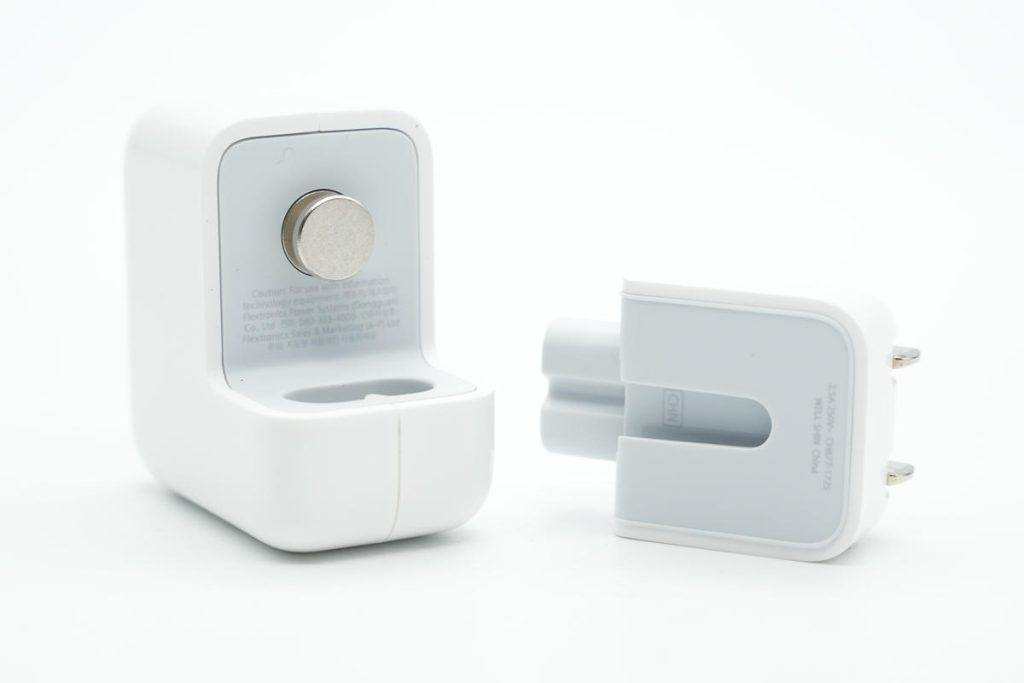
Seriously though, that does not sound safe at all.
> acidic sweat. once you got through the anodization the raw aluminum wears faster....
If one files off the sharp edges, won’t the sweat eat through everything faster, as that protective layer was filed off.
US Version: https://www.apple.com/shop/product/mw2n3ll/a/power-adapter-e...
The big recess above the pins is what encases the button of the charger and provides grounding if it includes metal strips. Assuming the charger itself has a metal button.
In the EU a grounded cable has been the default forever (I have a grounded cable from my 2010 MBP which I use as travel cable for my 2021 MBP)
Some heat is normal, but the sparking seems concerning.
If I use the 3-prong, which is usually tied to a long cable, I don’t feel the buzz.
I assumed that the additional grounding helped.
Can it cause the plastic on the mouse to break down?
Co-worker 1: Interesting. I wonder if that voids the warranty. It's Apple you know.
Co-worker 2: May Jobs have mercy on their soul...
Co-worker 3: Not a bad idea. But not sure if that would cause problems with structural integrity of the laptop, like if you drop it or something.
Co-worker 4: The only downside I see is that you can no longer say "Hey, that's a sharp-looking laptop!"
I would use a CNC machine to round them more precisely and uniformly though.
1 and 3 are way more creative.
I don't know WHY... But corporate bureaucracies have logic of their own.
Are they? Everywhere I've worked they get shoved into a storage closet and ignored for another 5-7 years
Whilst I like that it increases the “tooliness” of the Mac it’s not of me I think.
I like mine pristine. ”There are many like it but this one is mine”, yada, yada.
Filing off the anodized layer is indeed bound to look awful.
Technically it can be done in a garage, but spot and/or intact application might be difficult. Strict color matching against Apple made things would be impossible.
Anodizing works as follows:
1. Take the MacBook apart
2. Clean it
3. Chemical bath to remove old anodized layer
4. Clean it again
5. Chemical bath with power supply attached. applied voltage+current and duration will determine hardness and thickness of the anodized layer.
6. Clean it
7. Dye it.
8. Seal the dye in a hot water bath.
It’s fairly straight forward to do.
Also, the way you acquire the knowledge, expertise and tooling is by screwing around with stuff where you have no idea what you’re doing.
Playing around with lithium batteries to build bigger battery packs (DYI Perks did this and even though he mentions the dangers of doing that (fire or electric shock) it’s still inspires people to do the same in their living rooms.
Then is playing with chemicals.
Again I’m not saying don’t do it. But one should ease into things not just grab a random set of chemicals and disassemble a laptop and hook up a power supply etc by just following a list from the internet.
In the context of a MacBook, it’s not. Removing just the aluminium components and leaving everything that doesn’t like baths undamaged is practically impossible for amateurs. I’m not sure it’s something many professionals would take on.
I’m wondering what custom colours you could do with that process btw!
https://lowendmac.com/2024/ryan-andersons-colorized-anodized...
Otherwise known as "remove everything from the chassis, leaving only the chassis."
But do so in a way that lets you fully re-assemble it later on, after you've finished the re-anodising.
> 7. Dye it.
Why the dye? I thought anodising's colour comes only from the voltage used, with no dye needed.
ie you can pick the colour you want, but you need to get the voltage correct for that colour
That's true for anodization processes for some other metals like titanium and stainless steel, but aluminum is dyed. Also the process is material specific. Anodization for Al is only possible because Al does that unique self organizing micropore thing.
If anyone's interested in details of Aluminium anodising, this seems like a decently thorough introduction: https://nzic.org.nz/unsecure_files/book/8E.pdf
People do home anodizing all the time, but colored home anodizing on electronics is very rare.
The way to do it would be wrapping it in, say, a wet paper towel with your strong acid solution (but not sulfuric, because that would turn the paper into pure carbon foam) and running outside current from the laptop through the paper to a cathode, or vice versa.
When this line of MacBooks first came out in 2021 and I bought one (I desperately needed an upgrade), I was joking that it's top-notch hardware.
Luckily I use it like a desktop 95percent of the time.
Drop them like it’s hot!
C2: Homo-religious
C3: Homo-enginerus
C4: Homo-bros
The pci extension slot edges in most PC cases or the IO are way sharper. I’ve cut myself regularly on those when I was a little kid tweaking cases.
Author's another post on "The Seasons are Wrong" [0] is excellent too and I fully support both approaches.
I would propose boundaries that align partly with how I perceive the weather, and partly with how we plan our year (by months): Summer starts June 1st, Fall starts September 1st, Winter starts December 1st, and Spring starts March 1st.
There's no need to change the dates. They're already arbitrary based on the position of the sun and the earth and people have the experience to take them with the grain of salt necessary to the region they live in. People who live near the equator probably don't have much care for the notion of the winter at all. Folks who live far up north know that spring actually comes in much later than march 21st. People who climb glaciated mountains in the canadian rockies know they won't get summer conditions until late june.
My understanding is that tropical regions tend to divide the year into "wet season" and "dry season".
I've also always thought that the equinoxes and solstices should be the middle of the seasons, so using the 'cross-quarter' days as the beginning of seasons makes more sense.
probably same for other post-soviet countries too?
But we lost a lot of nice symmetries that way, which is unfortunate
Summer doesn't work with that association though, with the latest sunset being the end of June instead of the start.
You do realize there's also a southern hemisphere on planet Earth?
In Australia it's just split up by months, with each season being 3 months long:
March 1 - Autumn starts June 1 - Winter starts Sept 1 - Spring starts Dec 1 - Summer starts
Of cause, those in far northern Australia, only really have Dry and Wet seasons. I have no idea when those are.
Adelaide’s climate anecdotally feels to be more humid in recent years (historically bone dry Mediterranean climate) and the seasons feel like they’ve shifted a few weeks forward.
The Kaurna (Australian Aboriginal people of Adelaide, pronounced Gar-nuh) apparently mapped seasons a little differently, with a longer summer that resonates with my experience:
https://www.bom.gov.au/resources/indigenous-weather-knowledg...
The Noongar people of Western Australia have a 6 season model that also maps pretty well to my experience in South Australia.
https://australiassouthwest.com/six-seasons-of-the-south-wes...
But most countries other than the USA use meteorological definitions of the seasons starting on the 1st of December, March, June, and September.
In India our summer holidays start at the end of March and finish in the start of June. That’s usually our hottest months too. And a lot of our regional “New Year” calendar’s and related festivals are on April 14th and can probably be considered the start of summer.
I played around with weatherspark and all the places I tried looked like this :
https://weatherspark.com/compare/y/1705~8813/Comparison-of-t...
That said being an English speaking country and absorbing a lot of media from other English speaking countries, there’s been a slow drift towards the American system making its way in, so younger generations are more likely to use American seasons and older people more likely to use traditional seasons, though you’ll find people of all age groups using either. Certainly they taught the traditional seasons in school when I was a kid, I wonder which they teach now.
(Of course, you could make yet another system based on the weather where summer is approximately two weeks in July, winter is a thing that happens every few years and the rest is a sequence of mild weather with occasional wind and scattered showers)
In Finland the traditional division is that winter is Dec-Feb, spring is Mar-May, summer is Jun-Aug, and autumn is Sep-Nov. Historically it has made perfect sense, weather and climate wise – particularly from the point of view of agriculture, which is of course the reason people used to think about seasons in the first place!
February in particular is 100% winter in Finland with no signs of spring besides the days starting to get very noticeably longer by then. It's often the coldest month of the year and when schools usually have a week-long winter break. Similarly, August is very definitely a summer month except in the far north where spring comes late and autumn early. The academic year in schools and universities typically starts at the end of August, so that's a clear and important dividing line in many people's lifes. In Southern Finland, December is these days rather autumny more often than not, and there's often no lasting snow until January (if even then). June is a crapshoot, it can be nice and warm or surprisingly cold.
I guess Jan-Feb are definitely winter, Apr-May definitely spring, Jul-Aug definitely summer, and Oct-Nov definitely autumn. The rest are kind of transitional and their weather unpredictable. Of course, the climate change isn't helping things, either.
https://sv.wikipedia.org/wiki/V%C3%A5r_i_Sverige
The definition would certainly work in English countries, seeing it is just 0 to 10 degrees Celsius average over the course of a week (and after 15th of February).
https://youtu.be/y8HEZ-x4-_w?t=402
Getting the shade right could be tricky though.
The edges are indeed extremely uncomfortable, not to mention how cold it is in winter.
Luckily its just sitting on a stand 99.9% of the time
I've got no idea why, but the sharp feeling is amazing.
When apple releases a 12" retina Macbook M-series, I'll be the first in line, I don't think there's a better laptop for size and aesthetic.
These objects are becoming more like clothing and less like unyielding industrial machines. It's to the point that I'd be genuinely disgusted to handle any used laptop regardless of how "clean" it is.
It's not a new thing, cars started getting fins in 1948.
Ok… but I don't like to injure my wrists…
[1] https://x.com/andrewculver/status/1297575768520716288/photo/...
The power to personalize should not be underestimated--even at the cost of durability and overall functionality.
And yes, why are they so sharp?
I seem to recall my wife having the plastic MacBook that came out circa 2006 and the edges on that thing were legitimately painful.
I always marvel at how sharp the points are on the notch of the lid on my current MacBook. Very very pointy.
they intentionally ship them sharp so you can file them down to your desired fillet
the design is very human
They are quite stabby and I hate them.
https://www.cnet.com/a/img/resize/aca51a7051edc493b19cfd93da...
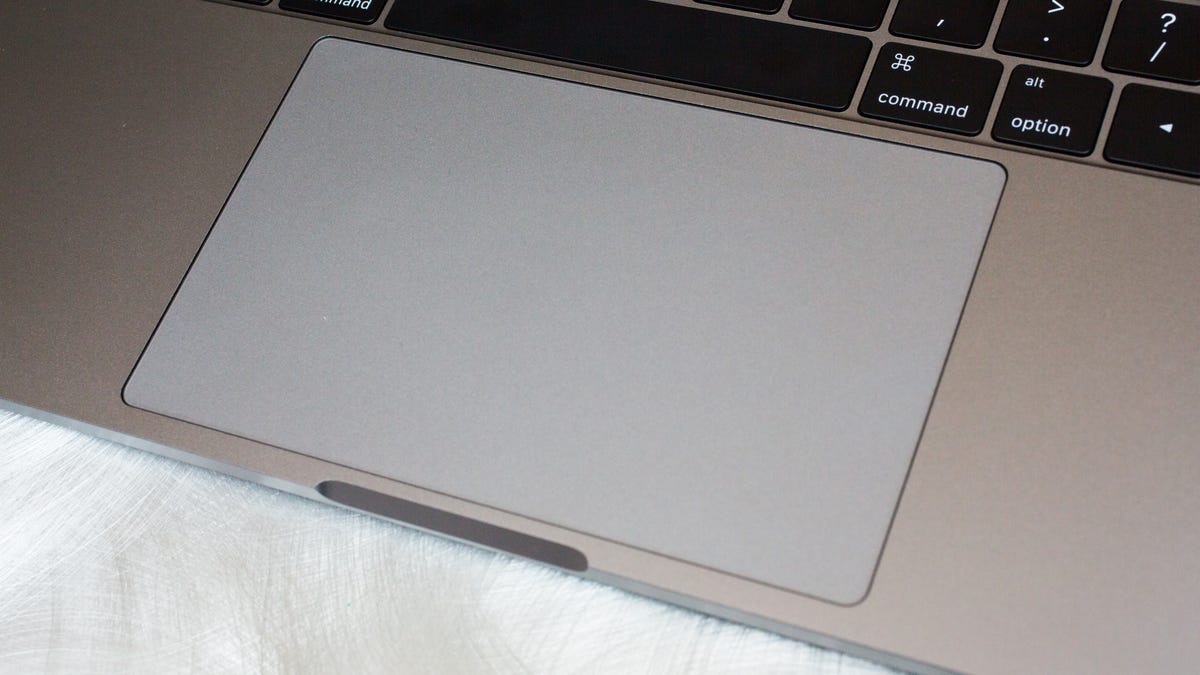
Unibody Intels before that were really really sharp.
I have intrusive thoughts of trying to cut my finger over it, but so far the attempts were unsuccesful.
Alternatively, because they care about aesthetics more than utility and comfort.
«During the first Jobsian era at Apple, I used to joke that Steve Jobs cared deeply about Apple customers from the moment they first considered purchasing an Apple computer right up until the time their check cleared the bank.» (Bruce Tognazzini)
They still sell computers, which count below 10% of the revenue, and are also partly fashion accessories.
But the obvious way to handle that problem is to put it in a case. For example: https://www.itslaut.com/products/crystal-x-case-for-macbook-...
I wasn't thrilled with a product design that required a case to protect the rest of the world from the product, but it obviously makes more sense than trying to file the MacBook yourself.
Since I mentioned Tahoe, it bears repeating, my spotlight is still broken.
[0] https://ljpuk.net/2025/05/23/how-does-the-space-black-macboo...
get a single-cut fine file, maybe with a little more weight than the one in the video. single cut file has diagonal slots and allows firm and continuous contact with the piece. most files are double cut, have two sets of slots and look like bumpy diamonds. they remove more material but tend to bounce.
use long even strokes with firm pressure, only during the fore stroke. watch out for roll-off, where you unconsciously change the angle or pressure of the file as you're at the end of the stroke.
you can make a pretty even-looking chamfer that way.
Heck, a little part of me is tempted to try the smallest radius round-over router bit I have in a trim router, but the odds of that going horribly wrong are just way too high.
is this an employer-issued computer? Like if I did something similar on my DELL laptop (us lowly devs at %DAY_JOB% don't have Macs), management would be up my ass the minute they saw this, if only because the maintenance agreement the company has with our supplier will likely be voided for my machine.
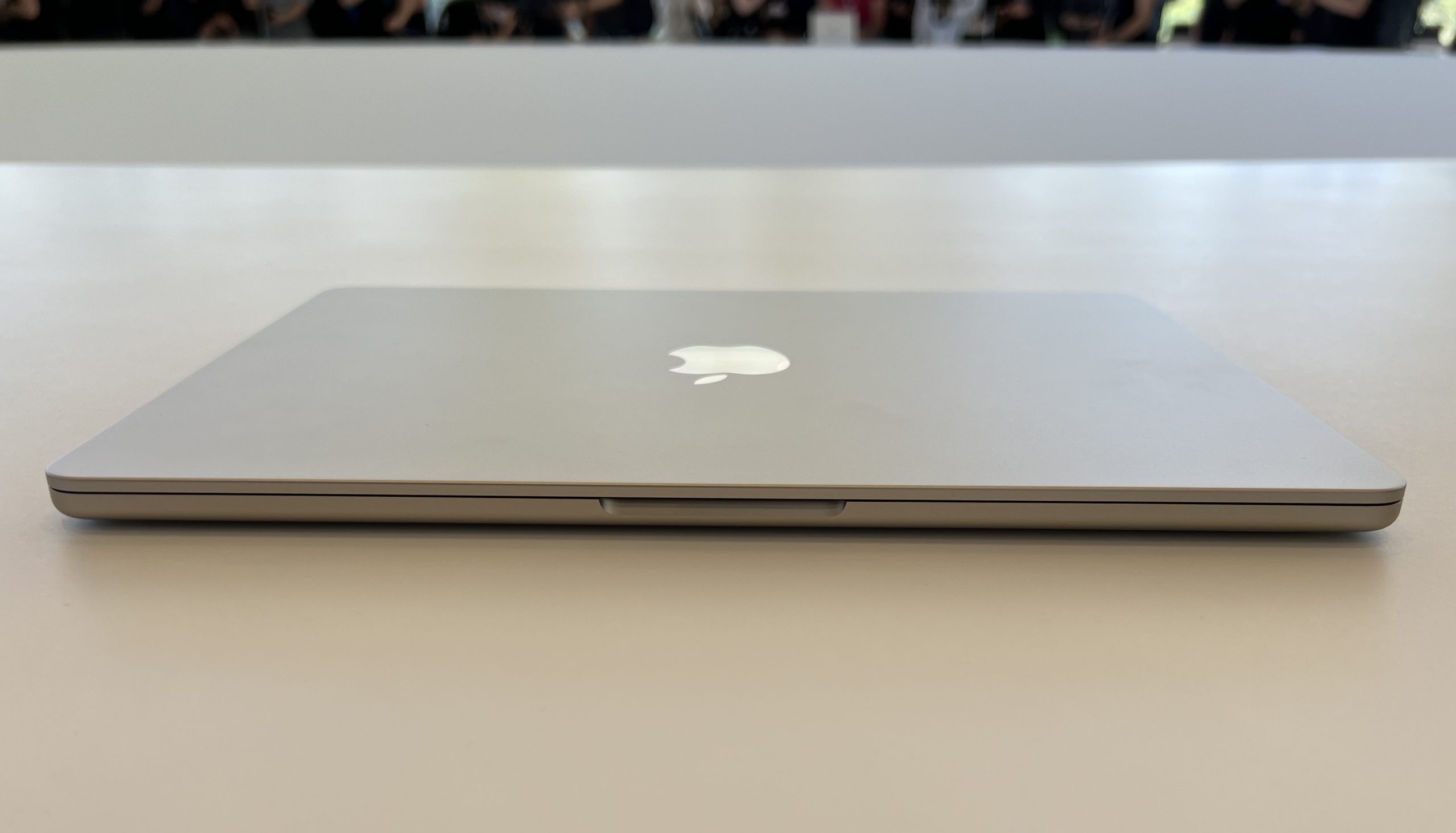
So the seam looks neat when the macbook is closed, eg. https://cdn.arstechnica.net/wp-content/uploads/2022/06/MacBo...
I'm strongly convinced that modern iPhones designed to use in case as basic idea, while using iPhone without case is like using that Nokia phone unit when you take the housing off. In that case I think that iPad with magnetic keyboard (which is soft-touch plastic) is the future of Apple mobile computers.
- Sharp edges eat into my forearms.
- Glossy screen makes it hard to see when it's light out.
- The keys have a real hard stop when you press on them which tires out my hands.
- An arrogant desire to obsolete ports.
I don't understand the appeal of the machine, it feels like style over function everywhere.
Now the only annoying things are the MacOS window manager (uBar attempts to fix this, but is flaky) and the weird keyboard mappings for things like "start of line", "end of line", "previous word", etc. Karabiner fixes those if you're willing to invest 3 hours in setting it up.
Those are Emacs keybindings, and they're also present by default in Bash since they were copied by GNU Readline. They're one of the few things I really like about macOS. (But I'm an Emacs user and I'm also used to using them in my terminal.)
The window manager never stops sucking. Rectangle and Contexts or Witch help. Ice helps with the stupid menu bar design and problems with overflowing icons or oversized menus.
I think there must be a better solution than a file, like an attachment to effectively round the edges, or even something like fingerless gloves.
On the other hand Apple always replace the top case when the keyboard needs changing so the filing approach may not be entirely insane. It might send a message to Apple.
Especially the gloves, come one, that's peak Apple "you're just using it wrong" mentality. Apple made a bad usability decision for the sake of sexier design. It's not your fault, it's theirs. Fix the defect, not yourself.
I like the idea of fully blending the notch, rather than just rounding slightly. Looks comfy and distinct!
Though you're right that machines whose exteriors are customized and unusual are less likely to get stolen.
Totally fine to do whatever you want to your personal belongings though.
I'm betting they don't notice if I file down the corners. Hell they probably wouldn't notice if I just cut the corners off with a fret saw. But God forbid I try to install an ad blocker or use Firefox.
"Ethical standpoint" seems like the wrong choice of words. I think you mean "equipment ownership standpoint.". Ethical implies a set of values, vs contractual terms of equipment use.
You can't be unethical to your employer, only to people like your coworkers and customers, or other living beings that your business activity impacts.
Bold move to do this on your work Macbook. I'd be too worried of getting chased down with a bill when returning the laptop eventually.
I would love to see the guys reactions when you have to give this back.
Also a little bit pedantry, you seem to have mostly filed the edge off, which seemed to be the real issue, the corners on that center divet are filed off, but its mostly edges
Are your wrists supposed to be coming into contact with that? I suspect many of us have bad posture and do rest our wrists like that, but if your concern is wrist comfort, you probably want to consider that you're going out of your way to enable harmful posture.
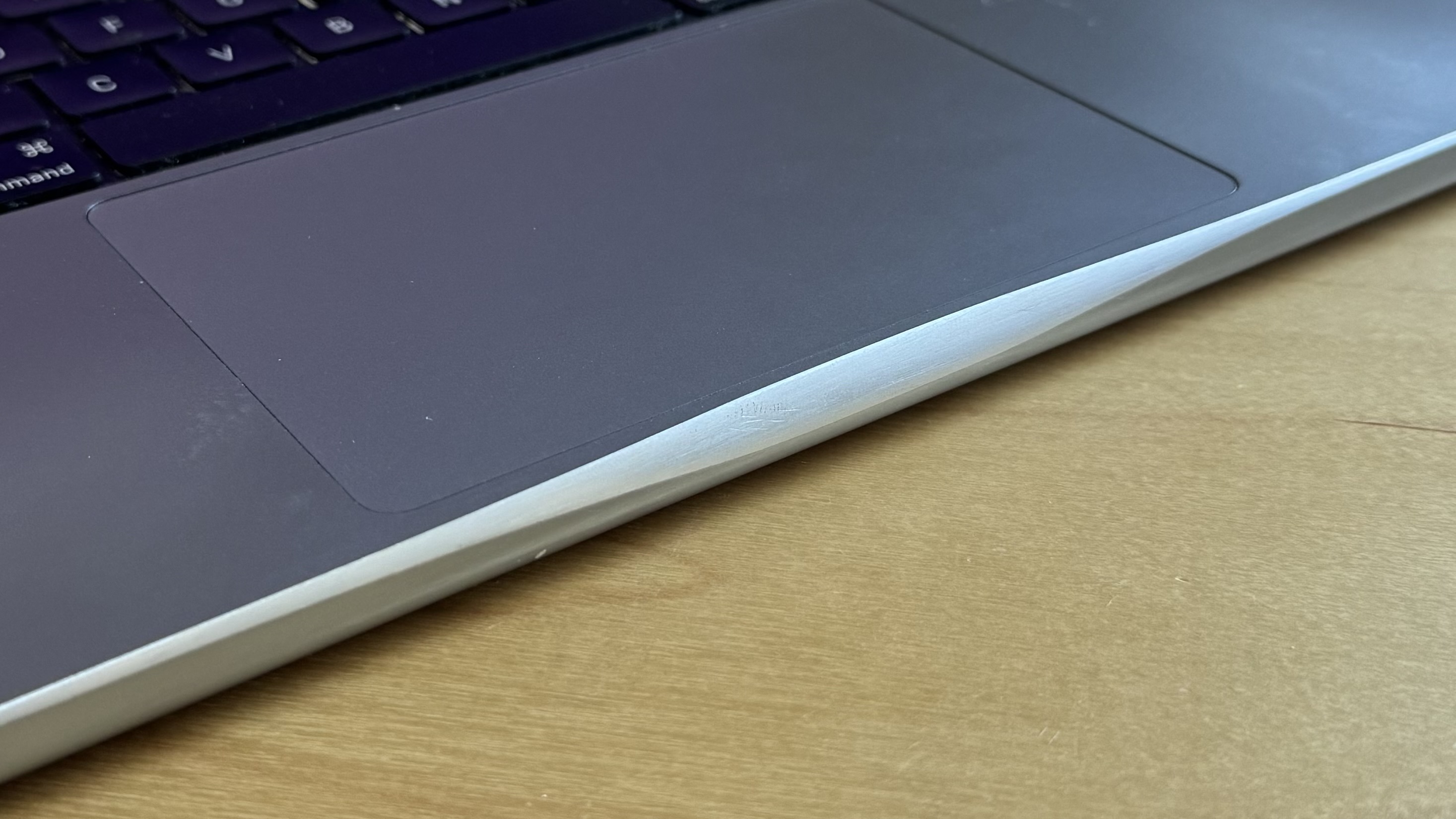
The machine is fine and I didn’t even have to adjust the screen as it was still correctly in place but on that corner the aluminium lifted up forming a mountain shape, about 2 mm tall and very sharp.
Not only this was uncomfortable, but it also meant I couldn’t close the lid properly and might eventually crack the screen from it, so I filed it away. Like OP, I started with a pretty gritty file to get most of the tip off, then finished with a multi-tool with the sanding attachment. I went through a few grits but I got bored long before it was smooth.
In the end, I actually liked the look, and have been considering going all around like OP. I may have to do it now.
I have to say that I now access the 8 or so machines across my LAN and VPS via a Macbook Air rested on my lap, either through RDP or SSH. I probably use this 80% of the time. Because the machine is on my lap, held up at about 30 degrees on my lap, I can't say I ever noticed the sharp edges, until this post!
Literally "you're holding it wrong".
It's a laptop computer.
If you want to break more rules, you might consider chickenwing-ing your arms a bit. Deviate from the homerow and learn to feel your way around at other angles. Then you can hold the laptop closer to you without putting your wrists at a weird angle (though you may have to use a non-thumb finger for spacebar, as I do).
As I type this, my laptop is partly on my belly and partly on my chest, and my wrists are so far out to the sides that they completely miss the front edge of the laptop altogether. The angle is pretty favorable, too: my palms rest on the laptop on either side of the trackpad, and my wrists rest over the left and right sides of the bottom case but have little to no pressure on them.
No RSI here, either. Just make sure you're loose and comfortable and not forcing anything! That seems to help a lot.
MacBooks (and many laptops) have a tiny amount of alternating current that leaks through the metal chassis to ground. When you use the compact 2-prong power adapter (the “duck head” without a ground pin), there’s no path for this leakage current to safely flow to earth ground — so it flows through you instead, creating that tingling sensation.
Interestingly I haven’t felt this when using my 2 prong NAND Anker adapter.
also, where is the new version of Visual Basic, Ballmer? Your sweaty chants can only distract me for so long…. Wait….. ITS BEEN TWENTY YEARS!?!?
found the Windows 8 enthusiast! haha, I kid. (I myself use a tiling window manager , i3, with completely square windows without any gaps or rounding)
If I could run the Windows 2000 UI on a modern OS I would but any recent clone/theme/etc feels too uncanny valley.
The square corners are part of a 2 pixel wide border (one black, one white) because who needs to waste space on handling things we aren't manipulating? But the title bar is high-contrast, because you'll go looking for it when you want to switch windows.
The round corners go with a fairly thick border in a customizable color, usually something very bright in the yellow, orange or cyan ranges. When you sit down, you should immediately know what is active.
(Yes, please tell me about some buggy half-compatible tiling window manager for my Mac.)
They don't have to be any particular shape or size. The property of being virtual overrides everything else when free of these self-imposed constraints.
Even if you lose the GUI and go back to text, the ideal terminal is a plane of infinite columns of arbitrary cell size that dynamically fills your field of view.
I'd further argue that the only reason VR/AR isn't more widely adopted is the lack of orthographic vs perspective modality per application (and uncomfortable headsets). In VR/AR, you don't want a window manager or even windows at all. What you want is a field manager (as in FOV "fields" of varying opacity that can be composited by the user). Shape and size is just an arbitrary region blended in with the environment.
For the sake of ergonomics, you'd more often prefer to project an interface onto a surface if you had the choice. When you don't, you probably want the projection to be orthographic, but for the edges to be fuzzy if not invisible. You'd generally want to be able to layer these interfaces as well instead of having opaque rectangles always in your way.
This makes perfect sense considering that most LCD displays, and practically all computer displays, don't have rounded corners. This trend of rounding displays and GUI elements is purely an aesthetic choice. I also find this obnoxious since the only thing it does is rob me of a few pixels which are often useful.
But considering Apple users have accepted living without a large block of pixels dead center at the top of the screen, which they've been sold as a "feature", the rounded corners are likely even less of an issue.
I'm not sure that an infinite plane of pixels makes sense even in XR. I want to see a clear edge of where digital content begins and ends, and a rectangle is the simplest and most optimal shape for that. So I would rather have physical display-like floating rectangles, than floating text in arbitrary locations, or rounded off corners for the sake of aesthetics. I'm not opposed to a very slight rounding off of edges on certain elements, but the trend Apple is pushing is supremely ridiculous.
I'm saying that there is room for your arbitrary preference for opaque rectangles if we all abandon the notion of a "screen". We are well past the point where we can do this economically. It only persists because of consumer acceptance. Traditional screens are less efficient in every tangible way. They are less power efficient for their apparent brightness and require more material to construct.
Even the notion of clear boundaries and pixel size is an illusion. Traditional screens only make the pixels so big because they require sufficient brightness and power to see them at that distance, not because we cannot manufacture smaller pixels for cheaper. We could have much better results for everyone and the only remaining cost/problem is finding a way to comfortably wear the display.
Thank you Apple, you have taken designed obsolescence to a new level.
It looks a bit strange, but to each their own, I suppose.
EDIT: this thing, below the trackpad https://imgur.com/a/DVzlDOj (What’s that even called? And is there a better image hosting service than Imgur?)
I appreciate the customization, but would probably make an effort to make it not look like (another) accident.
> This was on my work computer. I expect to similarly modify future work computers, and I would be happy to help you modify yours if you need a little encouragement.
I don’t understand the actual decision but I appreciate the gusto with which it was made.
If you’re not planning on doing that then it’s not really a factor for you.
Depending on exactly how much magnesium is in the alloy, metal shavings can be highly flammable and otherwise hazardous.
I think it's fine to mess with stuff like this, just make sure you know what you can do safely to the materials.
I also think you're an animal and need to be stopped before you do more damage to perfectly well designed machines.
To my eye, it is like the patina that your favorite tools get.
I’m looking at you, 40 year old tape measure.
I filed my work dell laptop too. Very different feel, but it is nice not living in feel of your own stuff.
I suppose I would prefer it nice and rounded and soft on my wrist - but I don't feel like it's quite as extreme as this thread would have you believe lol
This is a particularly hilarious customization both for its combined utility and shock value and also for doing it on a work computer.
It’s quite an annoying flaw, and i’ve only had this problem with the machines since the M1 redesign
All the same, hell yeah.
Most Apple laptops, such as the latest Pro's, are level, rather than tapered, and sit flat so that the user-facing edge cuts into your wrists. It's bad ergonomics, plain and simple. If you value function over form enough to modify your tools in this way, choose better tools.
3 physical buttons below the touchpad. That removed really many laptops. They would be nearly zero today, or really zero.
15 inches screen. Common.
Matte finish. Common.
User serviceable hardware. That removed many other laptops.
No number pad. I had to give up on that or I would have no laptop to buy.
I ended up with the first generation HP ZBook 15.
Respect.
I definitely empathize with "concerned I would file through the machine."
Few years back, I tried to look on reddit for complaints regarding this - barely anything.
A bit of 220 grit sandpaper and all the sharp edges are smooth and it actually looks pretty cool. I was grimacing at first but now I like the feel.
Do you have a brand you'd recommend?
I was worried about scratches because I abuse the shit out of anything I wear, and sure enough, there are scratches in the titanium bezel, but they look good in a way that scratches on my (non-pro) steel Apple Watch did not.
Very minor "you can just do things" collides with the "infallible object" presence that Apple wants for its products - almost feels "wrong", but it's a nice norm to break.
(and I'm not a "Cult of Mac" guy)
Not sure if the Apple Silicon devices have the same issue - but it was consistent through at least 3 different generations.
The channel’s Swiss host is famous for removing sharp edges from metal things.
Since the edge has been filed away, the rubber seal on the screen would no longer presses against the edge of the body protecting the screen.
There’s a sharp corner there is unnecessary.
Unless you fly/train travel alot I guess.
https://external-content.duckduckgo.com/iu/?u=https%3A%2F%2F...
Form only matters to a tool if function and usability are present, otherwise that object becomes more like art than a tool.
only the biggest POS tools have bad ergonomics on the industrial side. The real quality tools, the ones meant to be used on the factory floor or in a production line, think of human ergonomics first .
I would probably be considering that as I took a file to my laptop in order to keep it from cutting into my skin as I used it.
I applaud the ingenuity, but I detest the concept of aesthetic-first engineering without a thought for the human user of the thing. Vote with your dollar.
In the case of parent : I admire your ability to cope and the chutzpah it took to take a file to company property.
on a side note : I think it's absolutely fascinating in every Apple thread watching users trade tips on how to avoid electric shock, electrolytic/chemical pitting, and skin cuts like it's just normal computing worries. You folks have some thick skin to keep at it. I would be rubberizing the whole damn thing after the first zap.
And dont climb-cut
So I took some 1000 grit sand paper for metal and gently wet sanded the edge. If you rotate it a little you can get a very small radius evenly around the edge and it will keep a nice finish that matches brushed aluminum.
I'd actually feel comfortable doing this to a Macbook having done it to the drawer handles. Just use little pressure, back the paper with something flat, and check your progress often. It takes very little to remove the sharpness to the edge, to the point it's hard to see with the naked eye.
... it means the OPs job does not provide external monitors and proper keyboards :)
He honestly seems like a terrible designer, which seems corroborated by him doing nothing of remote interest outside of Apple and barely inside it. The items that are regarded as design epochs, like the iPod, we're not his.
Here's what it looked like freshly after filing fyi: https://kentwalters.com/posts/public/IMG_7438.jpeg
The fact that any conscious human being has the time or energy to be "freaked out" about someone futzing around with their own devices is astounding to me.
Damn good advice.
I know people hate apple and I get it but like if you sign the pact with the devil you get many benefits from that ecosystem
Besides I can’t imagine going back to windows, I would have to use Linux. It wouldn’t be a tragedy alright but I am at the point where I like less customization and more the readiness and it just works aspect
I never found comfort in the endangered Linux ricing communities either that usually enriches the experience above just OS
Preach.
Bet this person never heard about FAFO
Meanwhile a very important object called "Orion CM-003 Integrity" of the Artemis II mission is about to splash-down on Earth in 35 mins.