
The latency added in the monitor is described as around 8 us, completely negligible compared to any Internet connection's latency.
So the latency without the monitor should be completely irrelevant.
This part is saying the NIC with this monitor can transfer 4 KB to the host through the USB hub every 15.8 us. You can do the math and it's about 2gbps.
Remove the hub, and reduce the delay solves the problem.
Increase the burst size would work: 8 KB per 24.0 us would be sufficient for 2.5 gbps.
Increase the burst size and the transfer rate as done with the 5 gbps adapter, and that should work out, although that one is probably going to be insufficient for full rate 5 gbps as well.
I thought their "latency without the monitor" had referred to the overall end-to-end connection to the other IP endpoint, but they were talking about `NIC <-USB-> laptop`.
"if the speed of the drain from my adapter to my Mac is half a gig slower than the speed of the input, then you can imagine the buffer getting filled more and more until it overflows. Those are dropped packets, which result in a hard backoff when the router resends them, so you drop loads in speed. And that’s the reason for all of this."
With diagram https://blog.tymscar.com/studio-display-ethernet/bottleneck....
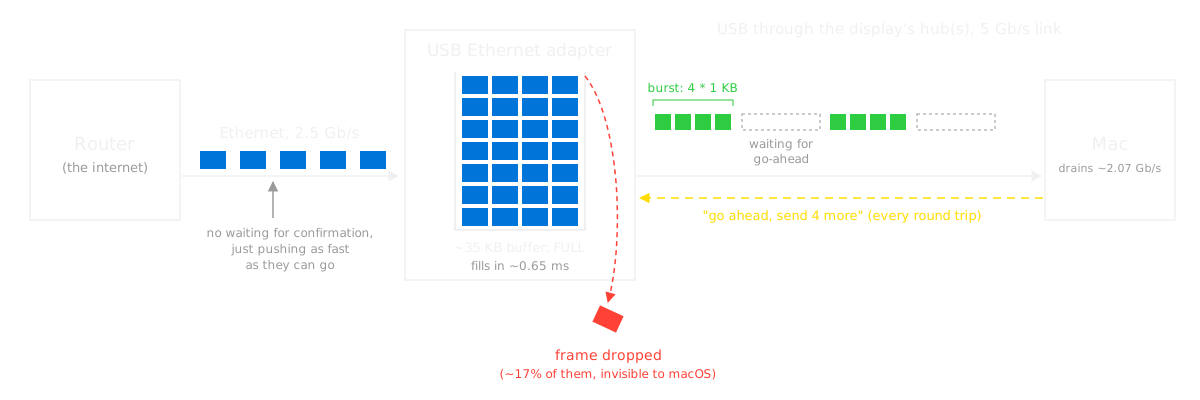
The monitor decides to send the adapter's packets on at only 2 Gbit/s, which leads to buffer overflow, thus packet loss, thus e.g. TCP congestion-control backoff.
The only thing we don't know is _why_ the monitor chooses to limit the bandwidth to those 2.07 Gbit/s (computed as the 41 KiB blocks per (7.6+8.2) µs). If it sent e.g. 81 KiB blocks, doubling the bandwidth, the problem wouldn't happen.
That'd be between Apple and the monitor.
The monitor was not really at fault. All USB hubs must read USB packets on all of their ports and copy them over to the upstream port. Those packets must all go into a buffer first so they the hub can send them individually even when they arrive simultaneously. That introduced just enough delay to allow the NIC’s internal buffer to fill up. Any hub would have caused the same problem. The solution was to buy a NIC designed for a higher speed because it has a bigger internal buffer. That new NIC will probably have the same problem with USB hubs, but at 5Gbps instead of 2.5Gbps.
Where does the "4" come from? The article's diagram suggests that the NIC's buffer is "~35 KB", though I don't know where that number comes from either (I supposed measuring how long it takes until frames are dropped). "4" seems to be the number of 1 KB packets (the 3+1 from "packet size 1024 bMaxBurst 3"), so a transmission size (protocol-level "window size"), not a buffer size. I guess if you are referring to that as a different "buffer", that makes sense, but it doesn't seem to be the buffer the article is talking about.
But you are right with your main point regarding latency. My statement
> The monitor decides to send the adapter's packets on at only 2 Gbit/s
isn't really right: It's not that the monitor "decided" to only send 41 KiB instead of larger sizes; the 41 KiB is the maximum that the NIC can send because its `bMaxBurst = 3`, and the latency added by the monitor being a USB hub then limits the bandwidth to the mentioned ~2 Gbit/s.
I guess the key point not said anywhere is that `bMaxBurst = 3` and `wMaxPacketSize = 1024 B` are fixed protocol-level parameters that hubs like the monitor have no control over. So the 4 KiB windows are fixed from the NIC through the monitor to the Mac; the monitor cannot e.g. decide to buffer some of those to compensate for the latency it adds.
It’s really the NIC’s fault because its buffer is too small to handle a little extra latency.
computed as the 4*1 KiB blocks per (7.6+8.2) µs). If it sent e.g. 8*1 KiB blocks
computed as the 41 KiB blocks per (7.6+8.2) µs). If it sent e.g. 81 KiB blocksIt's explicitly not a bandwidth issue (that would also affect the SSD). It's a latency issue - the chip doesn't have a big enough buffer to keep sufficient packets in flight at once.
That's explicitly the opposite of what the author says.
"the speed of packets coming into the adapter is 2.5 Gbps. That’s what the router pushes in. The speed going out is around 2 Gbps."
Of course latency is always on the denominator side in the "bandwidth = data / time" equation, but it seems wrong to claim it's latency when it could also be improved by fixing the numerator; it's the entire fraction that's insufficient, thus bandwidth. As written:
"The reason is that if you add up the average time it takes to get the go-ahead through my monitor’s hub, which is around 7.6 µs, to the average time it takes to send 4 KB, around 8.2 µs, you can find what the maximum speed is"
And later, increasing the numerator is exactly what fixes it with the other hardware: "I can see that instead of sending 4 1 KB packets per burst, it would send 8!"
> the chip doesn't have a big enough buffer to keep sufficient packets in flight at once
How does this make sense? Even if his buffer was 100x larger, if the fill bandwidth exceeds the drain bandwidth, it'll eventually fill up. The article says that explicitly:
"Well, if the speed of the drain from my adapter to my Mac is half a gig slower than the speed of the input, then you can imagine the buffer getting filled more and more until it overflows."
"buffer" was perhaps a poor choice of words on my part, because "buffer" is ambiguous. In this case I am referring to the notional "transmit buffer", which is 4 in the non-working case and raised to 8 in the working adapter.
> "I can see that instead of sending 4 1 KB packets per burst, it would send 8!"
Increasing the number of packets in flight does not change the bandwidth, it only improves latency sensitivity (i.e. you can fire more data before requiring an ACK).
> it seems wrong to claim it's latency when it could also be improved by fixing the numerator.
Increasing the bandwidth without increasing the transmit buffer would not fix this issue. The adapter he ends up buying does both (allow 2x the packets in flight, and 2x the bandwidth).
The bottom line here is that the original adapter handles full duplex 2.5g when plugged into the laptop directly, and the SSD gets full duplex bandwidth in excess of 2.5g through the same intermediate link (i.e. the display), so both the adapter and the display have sufficient bandwidth. The added hop of latency however makes the short transmit buffer insufficient to cover the latency.
Then I agree with what you were saying. Those 4 * 1 KiB are a protocol-level size (similar to the TCP window size), not an actual "buffer".
> Increasing the number of packets in flight does not change the bandwidth, it only improves latency sensitivity (i.e. you can fire more data before requiring an ACK).
That I don't fully follow. To me, the measured bandwidth includes all the effects of ACKs etc. If the the protocol demands that you can have at max 4 * 1 KiB unACKed in flight so you're waiting around for ACKs and not snding data, then increasing the number of packets in flight to 8 would 2x the bandwidth.
> The added hop of latency however makes [it] insufficient to cover the latency.
I agree with that, see also my newer reply https://news.ycombinator.com/item?id=50592931
I this context, I also agree with your original statement; I misunderstood what you referring to with "buffer" (meaning the window, not actual storage), and "bandwidth" (where I think you're referring to the 5 Gbit/s nominal bandwidth of the bus, irrespective of the fact that the effective bandwidth of data sent is much lower due to requiring ACKs for small data).